Legal Document Automation With Human Sign-Off
By Loïc Guyon (Tileo), founder of AI Jungle · Updated · 7 min read
Choose the artifact first, then judge the software that produces it.
Document automation automates document creation; Thomson Reuters also says it is not intended to replace or minimize lawyers’ work (Thomson Reuters). If the required artifact is an assembled legal document, Mitratech says HotDocs generates contracts, NDAs, and court filings (Mitratech), while Gavel says its product turns legal intake into complete documents (Gavel).
Keep the categories separate. A drafting interface does not replace a traceable comparison, and a change report is not document assembly. Generated text and comparison reports are inputs for qualified human review before reliance.
Which legal document automation category fits the job?
On this page
- Which legal document automation category fits the job?
- What should happen before an automated legal document leaves the firm?
- What is the best document automation software for lawyers?
- Is there an AI tool to create legal documents?
- Can ChatGPT write legal documents?
- When does a bounded contract-diff job fit?
- What must remain separate before anyone relies on the output?
- What should legal document automation reviews tell you?
Match the category to the artifact you need at the end of the job. The categories overlap in some products, but their outputs answer different operational needs. Keep the comparison even-handed by recording the input, the output, the evidence retained, and the human approval required.
| Category | Best fit | Artifact | Boundary |
|---|---|---|---|
| Approved-template assembly | Repeat documents built from structured intake | Gavel says it turns legal intake into complete documents. HotDocs says it generates contracts, NDAs, and court filings. [Gavel] [Mitratech HotDocs] | Keep the approved source template, validation, and qualified human approval separate. |
| Review and redlining | Inspecting or revising document wording | Gavel says it can review, redline, and draft contracts in Word and online. [Gavel] | Keep the source document and review evidence available for the human reviewer. |
| General-purpose LLM drafting | Producing draft text outside an approved-template system | A draft that must be checked against the source material and intended use | Do not treat generated text as approval or deterministic comparison evidence. |
| Bounded contract-diff output | Comparing two versions of the same agreement | Pitstop returns a plain-language change report grouped by topic, with clause numbers, changed-wording summaries, and operator flags for high-attention changes. [Pitstop service] | The output is an operations report, not legal advice. [Pitstop service] Pitstop is a bounded comparison-job option, not legal software. |
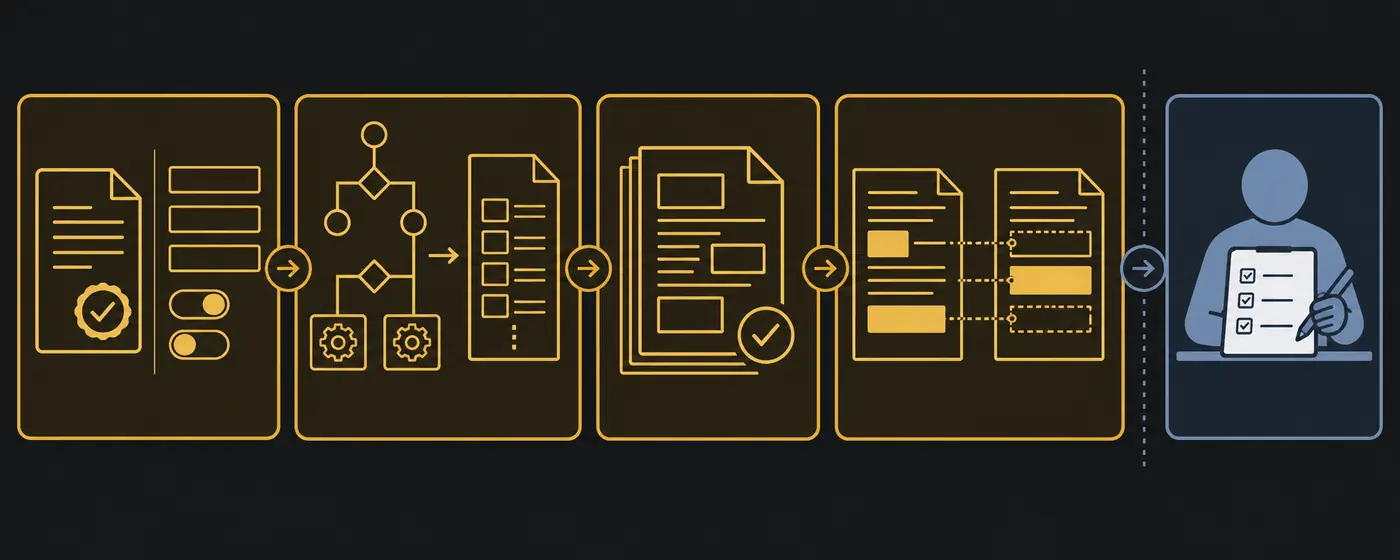
What should happen before an automated legal document leaves the firm?
Use this as the page's operating checklist for every mandate. It separates creation from review, sign-off and the act of sending.
| Stage | Source | Exact version | Reviewer | Decision | Trace |
|---|---|---|---|---|---|
| Generation | Record the source used to create the draft. | Identify the generated draft under review. | Name the person assigned to review it. | Mark it as draft, not approved. | Record the draft and its reviewer. |
| Comparison | Record the two documents used for the comparison. | Identify the exact comparison report under review. | Name the person assigned to review the reported differences. | Accept the report for the next step or return it for revision. | Record the report and the review decision. |
| Approval | Point to the output presented for sign-off. | Present the exact text that requires approval. | Name the person giving human sign-off. | Approve that exact text or return it for revision. | Record the decision and any gap in the journal. |
| Sending | Use only the output that received sign-off. | Match the document to the approved exact text. | Identify the person responsible for the send decision. | Decide whether the document may leave the firm. | Record which approved version was selected for sending. |
What is the best document automation software for lawyers?
The best document automation software for lawyers is the category that produces the required artifact while preserving the source and human approval boundary. The official sources cited here do not support a single product ranking. They support a narrower comparison of documented outputs.
- For intake-driven document assembly: Gavel says it turns legal intake into complete documents. [Gavel]
- For defined legal document types: Mitratech says HotDocs generates contracts, NDAs, and court filings. [Mitratech HotDocs]
- For contract review and drafting: Gavel says it can review, redline, and draft contracts in Word and online. [Gavel]
- For drafting and collaboration: LexisNexis describes document automation as helping law firms streamline drafting and collaboration. [LexisNexis]
Legal document automation reviews become more useful when they name the artifact under review. A review of template assembly does not answer whether a tool provides deterministic redlining. A review of drafting quality does not answer who approved the source template. Compare like with like.
Is there an AI tool to create legal documents?
Yes, products in this market can turn intake into documents or generate defined legal document types. Gavel says it turns legal intake into complete documents. [Gavel] Mitratech says HotDocs generates contracts, NDAs, and court filings. [Mitratech HotDocs]
The existence of generated text does not settle whether the output is ready for use. Keep four elements separate: the approved source template, the structured intake, validation, and qualified human approval. If a product also offers review or redlining, keep that evidence distinct from the generated draft.
Free legal document drafting software belongs to the same decision process. "Free" describes access, not the resulting artifact or its review status. Check whether the output comes from an approved template, a general-purpose prompt, or another source. Then apply the same qualified human review rule before reliance.
Can ChatGPT write legal documents?
For this buying decision, place legal document text obtained from ChatGPT in the general-purpose LLM drafting category. Do not treat that text as approved-template assembly, deterministic comparison evidence, or qualified human approval. Under this article's operational rule, the draft requires qualified human review before reliance.
The distinction matters because the artifacts are not interchangeable. Template assembly ties structured intake to an approved template. Redlining records differences or edits. A bounded change report describes differences between two supplied versions. General-purpose LLM output is draft text. Calling all four "legal document automation" hides the choice the buyer must make.
Do not use an LLM summary as proof that two documents match or differ. If the task is comparison, retain deterministic comparison evidence. The existing guide to choosing a document comparison tool explains the documented Word and PDF comparison artifacts.
When does a bounded contract-diff job fit?
A bounded contract-diff job fits when the input is two versions of the same agreement and the required artifact is a change report. Pitstop accepts the two versions as documents or clean text. The output is a plain-language change report grouped by topic, with clause numbers, changed-wording summaries, and operator flags for high-attention changes. [Pitstop service]
Pitstop checks fit, data handling, and availability before accepting files or credentials. The output is an operations report, not legal advice. [Pitstop service] It does not assemble a new legal document, replace deterministic comparison evidence, or provide qualified human approval.
If that lane matches the artifact you need, Request a scoped AI job. If the job repeats as part of a wider document flow, review the automated document processing guide and the available Pitstop machines without treating the bounded report as legal software.
What must remain separate before anyone relies on the output?
Keep generation, validation, comparison evidence, and qualified human approval as separate records. This separation makes the status of each artifact plain. It also prevents a generated summary from being mistaken for the source or the evidence.
- Source record. Keep the approved template or the two supplied agreement versions that define the job.
- Generated artifact. Label the assembled draft, redline, LLM draft, or bounded change report by its actual category.
- Validation record. Keep validation separate from both the source and the generated artifact.
- Comparison evidence. For a comparison job, retain deterministic evidence rather than replacing it with a generative summary.
- Approval record. Record qualified human approval separately before anyone relies on generated text or a comparison report.
Thomson Reuters describes legal document automation as automating document creation and says it is not intended to replace, minimise, or threaten what lawyers do. [Thomson Reuters] That description supports a useful buying boundary: automation produces an artifact, while the human review remains a separate step.
What should legal document automation reviews tell you?
Useful legal document automation reviews identify the input, the output artifact, the retained evidence, and the approval boundary. Product labels alone are too broad for a sound comparison. The same legal document automation company may describe assembly, drafting, review, or more than one category.
When a shortlist mixes legal document automation companies, compare documented outputs within the same category. Put template assembly beside template assembly, and put review and redlining beside review and redlining. Keep a bounded change report separate because its input is two agreement versions and its output is an operations report. General-purpose LLM drafting also remains separate because draft text is not deterministic comparison evidence. This category check keeps the required artifact visible while you read each product description.
Use these questions when comparing legal document automation software:
- Does the job assemble a document from an approved template and structured intake?
- Does it review or redline existing wording?
- Does it produce general-purpose LLM draft text?
- Does it compare two versions and return a bounded change report?
- Which source, validation record, and deterministic comparison evidence remain available?
- Where does qualified human approval happen before reliance?
A product page can establish what its publisher claims the product does. It cannot establish an independent ranking or a result from hands-on testing that did not occur. That is why each product statement in this guide stays attached to its official source.