Document digitization services | Pitstop
By Loïc Guyon (Tileo), founder of AI Jungle · Updated · 9 min read
On this page
- What should document digitization services deliver?
- How do you turn a physical document into an accepted digital record?
- What is the fastest way to digitize documents without hiding defects?
- How should field validation and exception handling work?
- How much do document digitization services cost?
- What are the best ways to digitize old documents?
- Why don't organizations digitize everything?
- Should you choose online software or a digitization service?
- Should you use a local or online document digitization service?
Choose document digitization services by testing a small, representative batch before approving the main run. Define separate acceptance checks for page capture, text transcription, field validation, exception handling, and the delivered audit artifact. Require the provider to return both usable files and evidence that connects each source item to its output and any unresolved issue. Do not accept a polished search demo as proof that the underlying pages, text, and fields are correct. I would choose the provider whose sample delivery makes every result easy to trace, reject, correct, and approve.
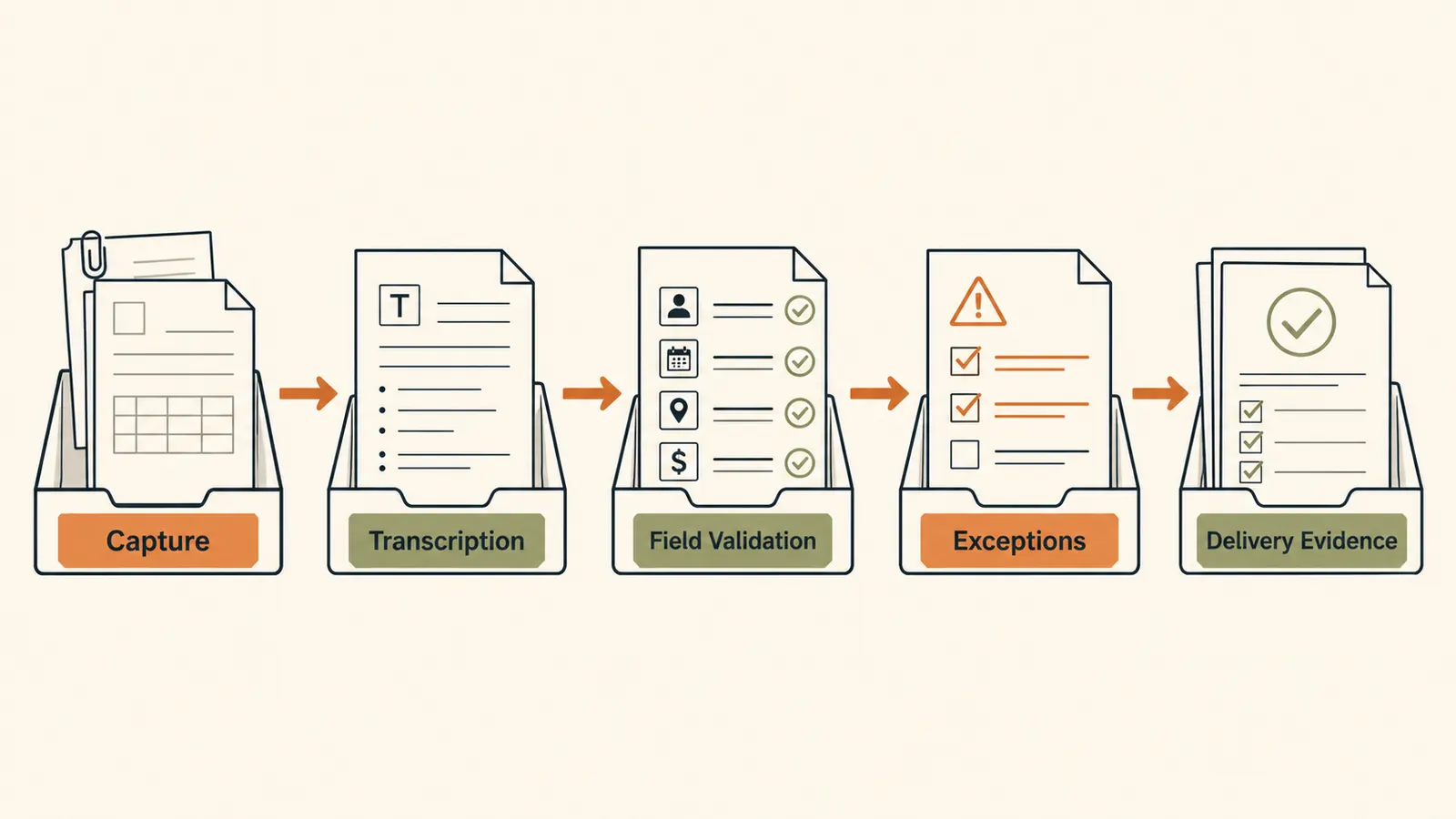
A scan can look clean while its text or extracted fields are wrong. Accept each layer separately.
What should document digitization services deliver?
A useful delivery contains the captured document, any requested text or fields, a record of exceptions, and an index that ties those pieces together. Scanning alone creates an image. Digitization may also include imaging, storage, and access to records, as the Access service description illustrates (Access). The buyer still needs to specify which of those outputs belong in the run.
Use this publication's acceptance rubric to keep the scope explicit:
| Work layer | What the provider does | What you inspect | Acceptance evidence |
|---|---|---|---|
| Capture | Creates a digital representation of each source page or item | Completeness, order, orientation, cropping, and readability | Source identifier linked to the captured file |
| Transcription | Converts visible content into searchable or reusable text | Characters, words, page breaks, and reading order | Text linked to its source page |
| Field validation | Checks requested values against the source | Value, format, and source location | Field value plus source reference and review state |
| Exception handling | Separates uncertain or unusable items from accepted output | Reason, affected item, and next action | Exception entry linked to the source and output |
| Delivery artifact | Packages files and records for review and import | Naming, relationships, status, and completeness | Manifest that accounts for every submitted item |
This table is an editorial checklist, not a claim that every provider uses the same process. A run may need only capture. Another may need capture plus searchable text. The contract, sample, and acceptance record should use the same scope.
Before you send a sample, define:
- the source unit you will count, such as a page, file, folder, photo, or bound volume;
- the required output for each source unit;
- the fields that need extraction, if any;
- the conditions that create an exception;
- the evidence needed to accept or reject the delivery;
- the treatment of originals after processing.
PTFS lists paper, photos, microfilm, microfiche, bound and unbound volumes, large-format material, books, and audio-video formats in its service description (PTFS). That range is a useful reminder to name the physical formats in your own batch. It does not show how a provider will handle your material.
How do you turn a physical document into an accepted digital record?
Treat the conversion as a chain of reviewable outputs, not one scanning step. Start with an inventory identifier. Keep that identifier attached to the source, the captured file, the text, the fields, and any exception. The identifier lets a reviewer move back to the source when something fails.
A practical acceptance flow is:
- Register the source item and its expected contents.
- Capture every in-scope page or object.
- Check that the capture is complete and readable.
- Produce text only when the scope asks for transcription or search.
- Validate only the fields named in the specification.
- Route uncertain results to the exception record.
- Deliver the accepted files with a manifest.
Each step needs a visible result. For example, the capture check can record that the reviewer accepted the file or sent it back. The field check can record the source location and the review state. An exception can record the reason and the next action without pretending that the value is known.
The manifest is the bridge between a box of source material and a folder of output files. If it cannot account for an item, the run is not ready for acceptance.
What is the fastest way to digitize documents without hiding defects?
The fastest defensible route is to remove avoidable variation before capture, then send uncertain work into a separate review path. Speed depends on the source and requested output, so the packet provides no sound basis for a universal duration claim.
Group the sample by traits that change the work. Separate loose pages from bound material. Mark pages with folds, attachments, faint text, mixed sizes, or an unusual reading order. If the final run includes several physical formats, put those formats in the sample. This gives the provider a chance to show how the process handles variation before the larger handoff.
Do not ask a worker or system to guess through an unreadable value just to keep the main queue moving. Define an exception state. The main run can continue while the uncertain item waits for review, but the manifest must keep that item visible.
For each sample item, run these acceptance tests:
- Compare the expected source inventory with the delivered manifest.
- Open the capture and inspect page order, orientation, edges, and readability.
- Compare requested text with the visible source.
- Compare each requested field with its exact source location.
- Open every exception and confirm that its reason and next action are clear.
- Confirm that corrected files retain a traceable relationship to the submitted item.
This sequence finds different defects at the layer where they occur. A missing page is a capture problem. A wrong character is a transcription problem. A correctly transcribed value placed in the wrong field is a field problem. Combining those checks into one vague quality label makes rejection harder to explain.
How should field validation and exception handling work?
A field is accepted only when the delivered value, its source location, and its review state agree with the specification. Define the field names before the sample run. State whether blank, unreadable, conflicting, and out-of-scope values are valid results or exceptions.
The exception record should preserve what the process knows. It should not fill a gap with a plausible value. Use a short set of reasons that match the source material, then require a source identifier and next action for every exception. Examples can include a missing source page, unreadable content, an unexpected document type, or a field that the specification does not cover. These are proposed categories for the buyer's rubric, not universal industry labels.
Correction also needs a boundary. Decide whether the provider corrects the item, returns it for buyer review, or excludes it from accepted output. Record the result in the manifest. If a corrected file replaces an earlier file, keep the relationship clear so the buyer can tell which artifact is current.
An honest exception is usable evidence. An unmarked guess is a hidden defect.
How much do document digitization services cost?
A useful quote maps price to a defined source unit, output, validation scope, exception path, and delivery artifact. The supplied sources do not support a market price, so this guide does not publish one. Ask each provider to price the same sample and state what the quote includes.
The quote becomes easier to compare when every bidder receives the same scope. Ask where the charge changes if the material needs different preparation, capture, transcription, field review, correction, storage, or return handling. Do not reduce unlike quotes to one headline amount. A capture-only quote and a capture-plus-validation quote describe different work.
Use the sample delivery to reconcile the quote with the artifact. If the quote includes field validation, the sample should show field-level review evidence. If it includes exception handling, the sample should show the exception record. If it includes storage or remote access, define what the buyer receives and where that responsibility ends. Access presents storage and remote record access alongside scanning and imaging, which shows why buyers should separate included outputs when comparing a scope (Access).
What are the best ways to digitize old documents?
Choose the method by the physical format and the output you need, then place fragile or unusual items in the sample. The packet supports no single best method for every old document. A bound volume, a loose page, a photograph, and microfilm are different source formats. PTFS explicitly lists those categories among the material it digitizes (PTFS).
Inventory the material before asking for a quote. Note the format, expected order, attachments, and visible condition without making claims about preservation treatment. Then state whether you need page images, searchable text, selected fields, or a combination. Ask the provider to explain the proposed handling in the sample scope and to mark any item it cannot process as specified.
For irreplaceable material, the buyer should define handling and return requirements with the responsible specialist or provider. This article does not supply preservation, safety, or legal instructions.
Why don't organizations digitize everything?
Digitizing everything can create outputs that nobody has defined how to accept, use, or maintain. A useful scope begins with the records and outputs needed for a stated workflow. It excludes material that has no approved output or acceptance path.
Ask four questions for each source group:
- Who will use the digital result?
- Which output do they need?
- How will they decide that the output is correct?
- What happens when the source cannot produce that output?
These questions do not decide retention, disposal, access rights, or regulatory duties. Those decisions need the organization's own responsible experts and applicable sources. The checklist here only decides whether a scoped digitization delivery matches its specification.
Should you choose online software or a digitization service?
Choose based on who owns source preparation, capture, review, exceptions, and final delivery. Software can support work that your team performs. A service can perform agreed work on submitted material. Neither label proves that the result includes validated fields or an auditable manifest.
Write down the owner of each work layer. If your team scans pages but a vendor extracts fields, define the handoff between the captures and the field output. If one provider performs the whole run, keep the same acceptance checks. The buyer still needs evidence for each required layer.
Should you use a local or online document digitization service?
Choose only after the provider explains how your source material enters the run and how every required artifact returns to you. Location alone does not answer the acceptance questions. A local service may receive physical material directly. An online workflow may fit files that already exist digitally. The supplied packet does not support a general claim that either option is better.
Use the same representative sample for each candidate. Compare the returned captures, text, fields, exceptions, and manifest against one written specification. Approve the main run only when the sample passes the checks that matter to your workflow.
Request a scoped AI job once you can name the input, required artifact, exceptions, and acceptance checks.