How to Choose an AI Notetaker for a Professional-Services Firm
By Loïc Guyon (Tileo), founder of AI Jungle · Updated
On this page
- What should happen before and after the meeting?
- How should a firm separate the brief, record, decisions, and follow-up?
- What workflow should a firm use?
- What should the decision table cover?
- Are AI notetakers illegal?
- Is an AI notetaker worth it?
- How should a firm evaluate AI notetaker cost?
- How do meeting notes fit inside the operating workspace?
- What should a firm confirm before adoption?
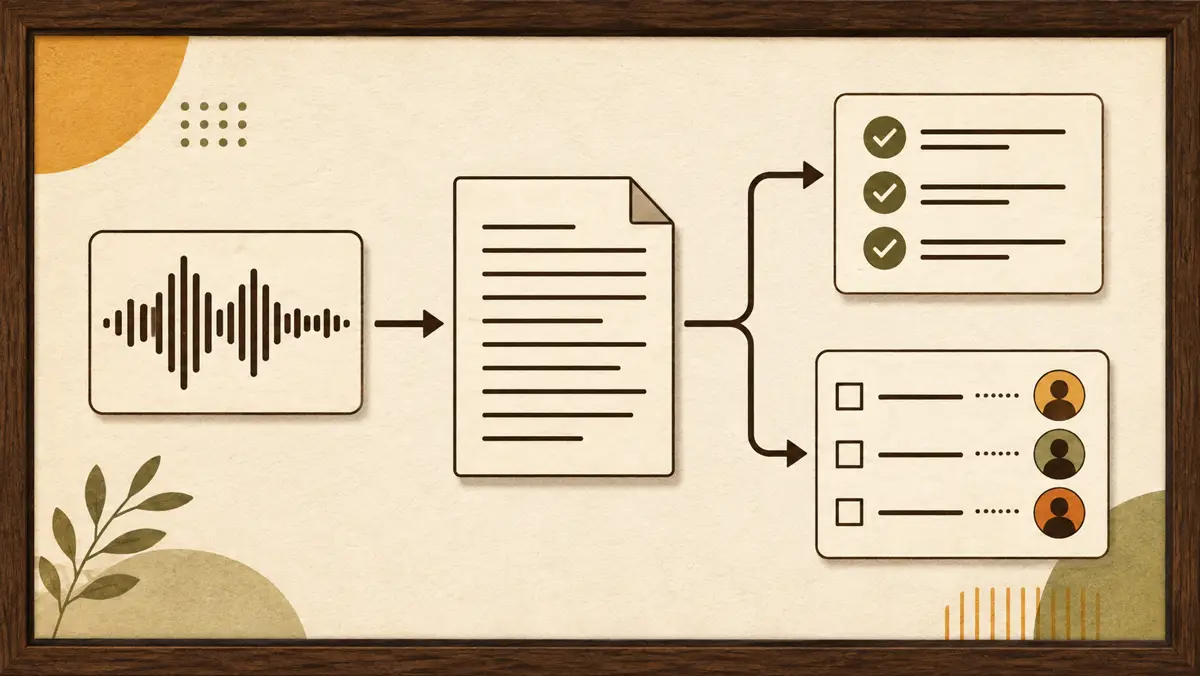
Choose an AI notetaker by testing the whole meeting workflow, not the transcript alone. Start with an AI meeting prep brief that gives a recruiter or consultant the purpose, context, questions, and talking points. After the conversation, keep the meeting record distinct from proposed decisions. Give every follow-up a named owner. The follow-up email waits for a person’s yes on the exact text. Agents ask before anything leaves; a person approves the exact text; the journal shows any gap. The right choice is the workflow your firm can govern from preparation through approval, with clear consent, access, review, retention, and sharing rules.
What should happen before and after the meeting?
An AI notetaker for recruiters or consultants should sit inside a defined path. Before the meeting, the team prepares the brief. During the meeting, the permitted capture process creates source material. After the meeting, a person reviews the record, decisions receive owners, and any client or candidate follow-up remains a draft until its exact text is approved.
This guide does not rank vendors or assume that one capture method fits every firm. It treats AI meeting notes for recruiters, advisers, and consultants as one governed part of client work.
Before choosing an AI notetaker, define the outputs your firm expects:
- A preparation brief with the meeting purpose, relevant context, questions, and talking points.
- A reviewed meeting record kept with its source material.
- Decisions written clearly and assigned to named people.
- Follow-ups with an owner and the context needed for a draft.
- An exact outbound message that a person can review and approve.
- A journal entry showing the approval or unresolved gap.
This framing changes the buying question. You are not only asking, “Can it take notes?” You are asking whether preparation, capture, review, decisions, and follow-up stay connected without turning a generated draft into an approved firm record.
How should a firm separate the brief, record, decisions, and follow-up?
The distinction matters because each artifact has a different job and owner. The examples below are illustrative workflows, not customer claims.
| Artifact | Executive-search mandate, illustrative example | Consulting engagement, illustrative example |
|---|---|---|
| Pre-meeting brief | Mandate context, candidate history, questions to clarify, and talking points for a candidate or client conversation. | Engagement context, the purpose of the client meeting, open questions, and talking points for the discussion. |
| Meeting record | Reviewed notes and transcript kept with the meeting, separate from later recommendations. | Reviewed notes and transcript kept with the meeting, separate from later recommendations. |
| Decisions | A decision about the mandate, candidate, longlist, shortlist, or next step, written with a named owner. | A decision about the engagement, client update, deliverable, or next step, written with a named owner. |
| Follow-up draft | A candidate or client email prepared from the reviewed record and waiting for approval of its exact text. | A client email prepared from the reviewed record and waiting for approval of its exact text. |
For an executive-search mandate, the brief prepares the partner or recruiter to enter the conversation with the relevant mandate and candidate context. The record captures what was said. A proposed decision then states what the team intends to do and who owns it. The follow-up draft is the external wording, not the decision itself.
For a consulting engagement, the same separation applies. The brief prepares the meeting. The record preserves the conversation. Decisions turn that record into owned work. The follow-up draft translates the reviewed outcome into exact client-facing text. Agents ask before anything leaves; a person approves the exact text; the journal shows any gap.
What workflow should a firm use?
The following workflow is a recommendation for evaluating and governing an AI notetaker. It is not a claim about how any particular customer works.
- Prepare the meeting brief. Gather the purpose, relevant context, questions, and talking points before the meeting. Name the person responsible for the meeting record and the review that follows.
- Capture with lawful consent. Decide how participants will be informed and how the firm will establish the consent required for that meeting under the rules summarized by the Reporters Committee for Freedom of the Press. U.S. federal law generally permits recording with the consent of at least one party, according to the Reporters Committee for Freedom of the Press. Some states require the consent of all parties, according to the Reporters Committee for Freedom of the Press. Interstate calls can make the applicable law uncertain, according to the Reporters Committee for Freedom of the Press. This is not legal advice.
- Review the record. Keep the notes and transcript with the meeting, then have the named reviewer check them before the firm relies on them. Distinguish source material from proposed decisions and follow-ups.
- Turn the record into action. Write decisions in a form the team can act on. Give each follow-up an owner. Prepare client-facing or candidate-facing text from the reviewed record.
- Approve the exact outbound text. Agents ask before anything leaves; a person approves the exact text; the journal shows any gap. Approval applies to the text being reviewed, not to a general intention to contact someone later.
- Preserve the decision trail. Record what was approved, what changed, and what still needs attention. The next reviewer can then see the history without treating generated notes as unquestioned truth.
What should the decision table cover?
Use this table during evaluation, procurement, or an internal workflow review. Replace broad claims with a demonstration of the exact process your firm intends to use.
| Criterion | Question to answer | Governance decision |
|---|---|---|
| Capture | How does the notetaker receive meeting content? | Define which capture methods the firm permits. |
| Consent | How are participants informed and consent handled? | Document the process to use before capture begins. |
| Source access | What meeting material can the system read? | Grant only the access required for the approved workflow. |
| Output | Does it produce a transcript, notes, decisions, follow-ups, or drafts? | State which outputs are records and which remain proposals. |
| Reviewer | Who checks the notes before anyone relies on them? | Assign a person for each meeting or meeting type. |
| Retention and sharing | Where do notes and transcripts remain, and who can share them? | Review retention and sharing terms before adoption. |
| Outbound approval | What happens before a draft leaves the firm? | Require a person to approve the exact outbound text. |
| Journal | Can the firm see approvals and unresolved gaps? | Decide what evidence the firm needs to retain and export. |
A polished summary can still be a proposal awaiting human review. Clear labels and ownership help prevent a draft from being mistaken for an approved firm record.
Are AI notetakers illegal?
Whether an AI notetaker may record a conversation depends on the applicable consent law and the participants involved, according to the Reporters Committee for Freedom of the Press. U.S. federal law generally permits recording with the consent of at least one party, according to the Reporters Committee for Freedom of the Press. Some states require the consent of all parties, according to the Reporters Committee for Freedom of the Press. Interstate calls can make the applicable law uncertain, according to the Reporters Committee for Freedom of the Press. This is not legal advice.
For a firm, the operational response is to make consent part of the meeting workflow rather than an assumption attached to the software, consistent with the jurisdiction-specific rules summarized by the Reporters Committee for Freedom of the Press. The review should cover the capture method, the participants, and the jurisdictions relevant to the meeting under the rules summarized by the Reporters Committee for Freedom of the Press. If the firm is uncertain about its obligations, it should obtain legal advice for its circumstances.
Is an AI notetaker worth it?
It is worth considering when the output fits a governed path from meeting preparation to decisions and follow-ups. The value question cannot be answered from transcription quality alone.
Ask the people who prepare, review, and act on meeting records to evaluate the same sample workflow:
- Does the pre-meeting brief contain the context, questions, and talking points the meeting owner needs?
- Does the output preserve the context needed to understand the meeting?
- Can a reviewer identify what came from the meeting and what the system proposed?
- Can the team assign each decision and follow-up to a person?
- Does an external draft wait for approval of its exact text?
- Can the firm inspect the approval history and unresolved gaps?
- Do the retention, access, and sharing arrangements match the firm’s rules?
An attractive summary is not enough if the team must reconstruct decisions elsewhere. A plain output can still be useful if it reaches the right reviewer, produces owned follow-ups, and keeps external communication under human control.
How should a firm evaluate AI notetaker cost?
Do not compare subscription labels in isolation. No current vendor pricing source is included here, so this guide does not quote plan amounts or answer vendor-specific price questions.
Build a cost review around the workflow the firm has approved:
- Which people need access to prepare, capture, review, and follow up?
- Is pricing structured per person, per firm, or around another unit?
- Which required capabilities are included in the evaluated offer?
- What review work remains after the system produces notes?
- What retention, sharing, and export terms require assessment?
- Would the firm need another system to manage decisions, approvals, or client follow-ups?
Use current written terms from each shortlisted provider for the final comparison. This keeps the decision tied to the actual offer and the firm’s required workflow without relying on stale pricing or unsupported vendor claims.
How do meeting notes fit inside the operating workspace?
Pitstop is the workspace where your team and your AI agents run the firm together. It brings projects, clients and CRM, network, meetings and preparation briefs, content, knowledge, and finance into one place.
For meetings, team members can prepare briefs, questions, and talking points. Notes and transcripts stay with the meeting. Agents may turn notes into decisions and follow-ups. Those agents may come from ChatGPT, Claude, or Codex through remote MCP with OAuth, or they may be built by AI Jungle.
The approval boundary is explicit. Agents can request approval and cannot approve. Approval is bound to the exact content fingerprint, so any change to the approved content invalidates it. External outputs wait for a person. Agents ask before anything leaves; a person approves the exact text; the journal shows any gap.
The validation inbox works on desktop and phone. The journal is hash-chained and exportable. Pitstop is hosted on AI Jungle servers in Germany and offers a free plugin.
Read more about Pitstop’s human-in-the-loop approach and its workspace for executive-search firms. The AI acceptable use policy guide can help when defining firm rules, while the AI governance framework for small firms places those rules inside a wider operating model. The distinction between AI agents and agentic AI can also help partners describe what the firm is approving. For a layer-by-layer comparison, read AI tools for boutique consulting firms.
What should a firm confirm before adoption?
An AI notetaker should enter the firm through a defined meeting workflow. Before approving one, confirm that:
- The permitted capture method is clear.
- The consent process has been reviewed for the meeting context under the rules summarized by the Reporters Committee for Freedom of the Press.
- Source access is limited to what the workflow requires.
- The preparation brief, notes, and transcript remain attached to the meeting record.
- A person owns review of the generated notes.
- Decisions and follow-ups have named owners.
- Retention and sharing terms have been reviewed.
- A person approves the exact text of any outbound message.
- The journal exposes approvals and gaps.
The useful unit is not the transcript. It is the reviewed path from preparation to an owned decision or follow-up, with a clear human boundary before anything leaves the firm.
. .